
Calumet County Court Calendars Explained
A docket search for Calumet County circuit court starts with the Wisconsin Circuit Court Access portal, or WCCA. The portal is the public calendar layer. It covers the Wisconsin Circuit Court in Calumet County. Open one case detail. Every event and hearing tied to that file appears there. A second tool, the Court Official Calendar, searches by county, court official, and a short date span. Calumet County posts no daily-docket feed of its own. So WCCA's two views are the main online source for circuit settings. Still, a calendar is only a schedule. It may list a pretrial, motion, or plea without the notice that set it. The Clerk of Circuit Court can confirm the branch, room, and current status, while municipal ordinance and traffic matters may instead run on a joint municipal court schedule.
Calumet Court Calendar Seven-Day Window
WCCA's Court Official Calendar caps a search at seven days. That suits one known week. It will not scan months at once. Pick Calumet, pick the court official, and enter your dates. Use Traffic only when that limit fits the matter. The official Calumet County court calendar interface on the WCCA site carries these same controls.
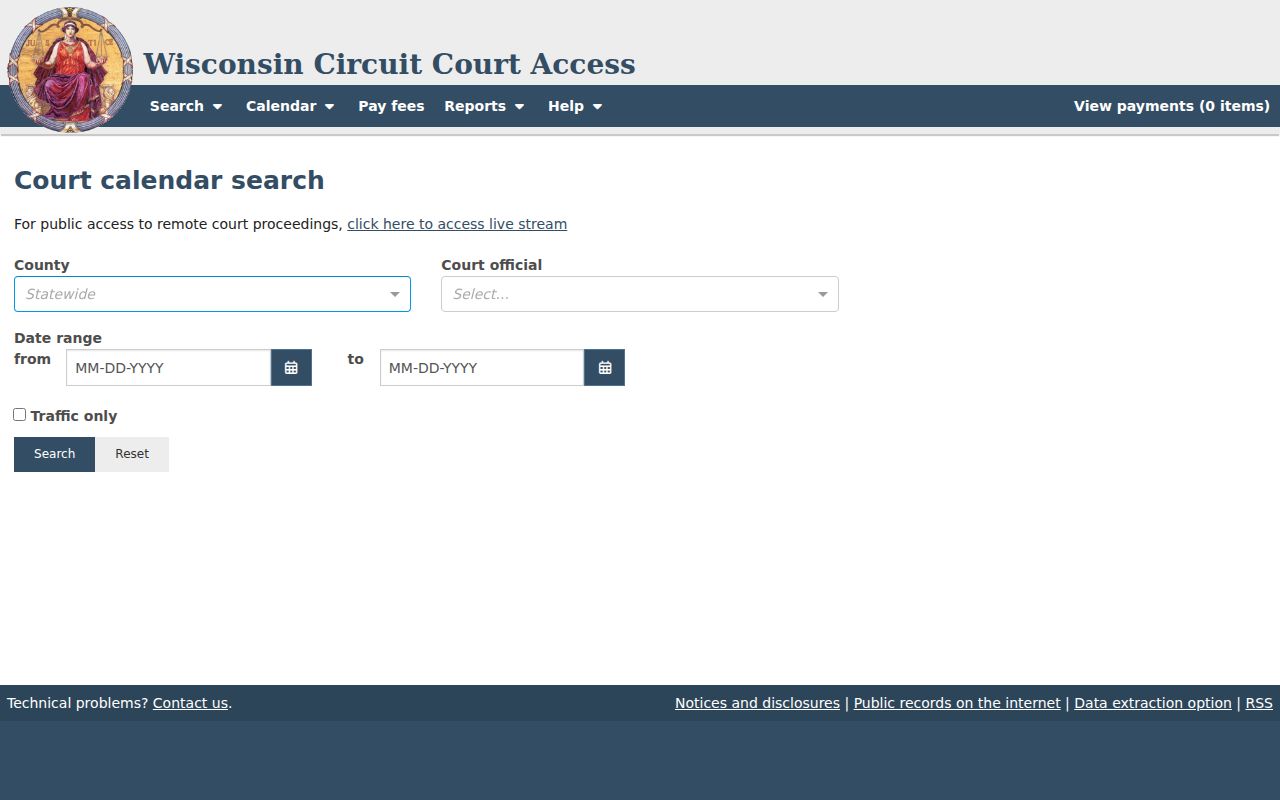
The capture distinguishes a date-range calendar from a party-name or case-number lookup.
Finding Your Court Date
Know the court and case identifier first. A Calumet County court date search moves quickly once both are in hand. Keep the court notice close, and when an online line looks old, blank, or at odds with it, use the clerk and branch contacts.
- Gather the case number, or note the party name, likely case type, filing period, and Calumet County.
- Search WCCA and open the matching case events and hearing settings.
- For a date search, select Calumet and the court official in the Court Official Calendar, then search no more than seven days.
- Record the date, time, activity, case number, and county-location field exactly.
- Call the Clerk of Circuit Court at (920) 849-1414 or use the counter and public terminal at 206 Court Street in Chilton when a listing needs confirmation.
- Contact the municipal clerk for an ordinance ticket, or use the federal calendar and PACER for a federal matter.
Branch assistants handle branch-specific setting questions. Call Branch I at (920) 849-1465 ext. 3501 or Branch II at ext. 3512, since court reporters are not scheduling clerks.
Calumet Court Dates Across Sources
A WCCA setting, a clerk confirmation, and a court notice each serve a different role. The online result is fast. A clerk can explain a recent reset. When a current notice or order conflicts with an older display, the newer paper controls.
| Source | Best use | Limit |
|---|---|---|
| WCCA case detail | Track one case | Not the full filed notice |
| Official Calendar | Search one Calumet week | Seven-day range |
| Clerk or assistant | Confirm branch, time, room | No legal advice |
| Municipal clerk | Confirm a city calendar | Separate court file |
How to Read a Court Setting
Read every field as part of one entry. The row number is not the case number. Activity tells you why the matter is set, while county-location points to the listed place or courtroom context.
| Date and time | The scheduled start; confirm recent changes. |
|---|---|
| Case number | The identifier that opens case detail. |
| Caption | The public case style. |
| Court official | The selected judge or official. |
| Activity | Pretrial, motion, plea, trial, sentencing, or another setting. |
| County-location | The place field linked to the event. |
A Branch I or Branch II assignment tells you who handles the case. It says nothing about the likely outcome.
Calumet Court Calendar Activity Labels
An activity label names the planned step, not the case result.
- Initial appearance
- A first appearance or return date, not a trial.
- Pretrial
- A conference or hearing before trial.
- Motion hearing
- Argument or a ruling on a motion.
- Plea hearing
- A hearing to take or consider a plea.
- Review or status
- A progress or administrative setting.
- Continuance or reset
- A move to a new date.
Small claims adds its own local terms. Return date, contested initial appearance, rent/damage hearing, and default judgment all describe stages under Calumet practice.
Continuances, Resets, and Cancellations
Dates move. A continuance, scheduling order, plea, or correction can reset any setting. A vanished or past entry is not an ending. Open the events for a later line, then confirm with the clerk or branch assistant.
Calumet County Small Claims Rule 13 asks for a written continuance request. The request must arrive at least five business days before the hearing. Later requests need good cause and court approval. That rule sets no single deadline for circuit or municipal matters. Remote appearance also needs prior approval. One caution: asking to move a Calumet County court date changes nothing. The change counts only if the court approves it.
Calumet Traffic Court Date Filter
The Traffic only checkbox narrows results. It does not decide where a citation belongs. Start with the notice and the issuing court. A state-law traffic case may show up in WCCA, while a city ordinance ticket may stay with a joint municipal court. Some readers need Brillion/Reedsville, New Holstein/Cleveland, Kiel/Schleswig, or Menasha/Neenah schedules instead. Those courts publish their own dates and plea paths, so their monthly or weekly schedules are not automatic WCCA results.
Calumet Municipal Court Calendars Differ
Municipal courts handle ordinance, parking, traffic, first-offense OWI and related matters inside their own areas. Each municipal clerk keeps that court's file and calendar. A circuit search cannot replace the city or joint-court contact when the ticket names municipal court. Check the named court's schedule and call the clerk. Split cities make this matter. A Menasha case from the Calumet side may route through Menasha/Neenah, while circuit matters stay at the Chilton courthouse.
Past Calumet Court Date Display
A past setting can still help. Read the next event for a reset, disposition, or follow-up task. Case status alone will not answer that. Open and closed are system states, not plain accounts of one hearing. If no later entry appears, call the clerk with the case number and date. Need the actual notice or order? Request the filed item, not the calendar summary.
Offline Calumet Court Calendar Access
No internet at home? A public WCCA terminal sits inside the Calumet County courthouse. The Wisconsin court technology office confirms that courthouse access. Stop at the clerk counter during weekday hours and someone will point you to it.
Phone, mail, and fax requests also work through the clerk for a Calumet County docket. Put the case number, the date, and the item you need in any written request. The clerk offers no general court-record email, so rely on the other channels. To see the event history behind a setting, the Case Lookup page lays it out.
If You Miss a Court Setting
Move fast. Check the docket events, call the clerk or your assigned branch, and get advice from a licensed attorney rather than waiting for a new online entry to appear. For a municipal citation, the named municipal clerk handles the question.
Missed setting: A missed appearance can lead to a warrant, default, bond action, or another response depending on the case.
Call the correct court at once, provide the case number, and ask how to confirm status.
Only the court can grant a new setting or relief; a request does not do so itself.
Different rules govern each situation. A small-claims default, a missed criminal appearance, and a municipal citation are treated separately, so the current order plus advice from counsel beats any guess built on one row of the docket.
Calumet Court Date Branch Routing
Calumet County runs two circuit branches under one roof in Chilton. Find your branch on the case detail or the notice first. The clerk keeps the record itself, while the branch assistant takes questions about each judge's calendar.
Clerk of Circuit Court
206 Court Street, Chilton, WI 53014
(920) 849-1414
Records, terminal access, copies, and routing.
Branch assistants
Branch I: ext. 3501
Branch II: ext. 3512
Branch-specific setting questions.
Check the official circuit directory before relying on staff assignments.